Two Systems, Two Different Numbers: How to Get Your Records to Match Before an Audit
When two systems show two numbers, pick one standard, run automated monthly checks, assign owners to every exception, and keep a trail so your records match before the audit.


Two Systems, Two Different Numbers: How to Get Your Records to Match Before an Audit
Notes on bringing HR, finance, and operations records into agreement, and keeping the evidence as you go.
The auditor's email lands on a Monday. Fieldwork starts in three weeks. The finance lead opens the payroll export and the HR roster side by side and sees it right away: the payroll system says 412 people were paid last quarter, and the HR system says 397 were employed. Both numbers are probably explainable. Neither is easy to explain on short notice.
So the next few days go to detective work. Someone exports both lists, sorts them by name, and starts matching rows by eye. A contractor shows up in one system and not the other. A name is spelled two ways. A termination date was entered in HR but never reached payroll. By Thursday the team has a spreadsheet of explanations, and a nagging feeling that next quarter will look the same.
This article is about getting out of that loop. It explains why two systems disagree, what auditors tend to look for, and how to set up one standard, automated monthly checks, and a documented trail so your records already match before anyone asks.
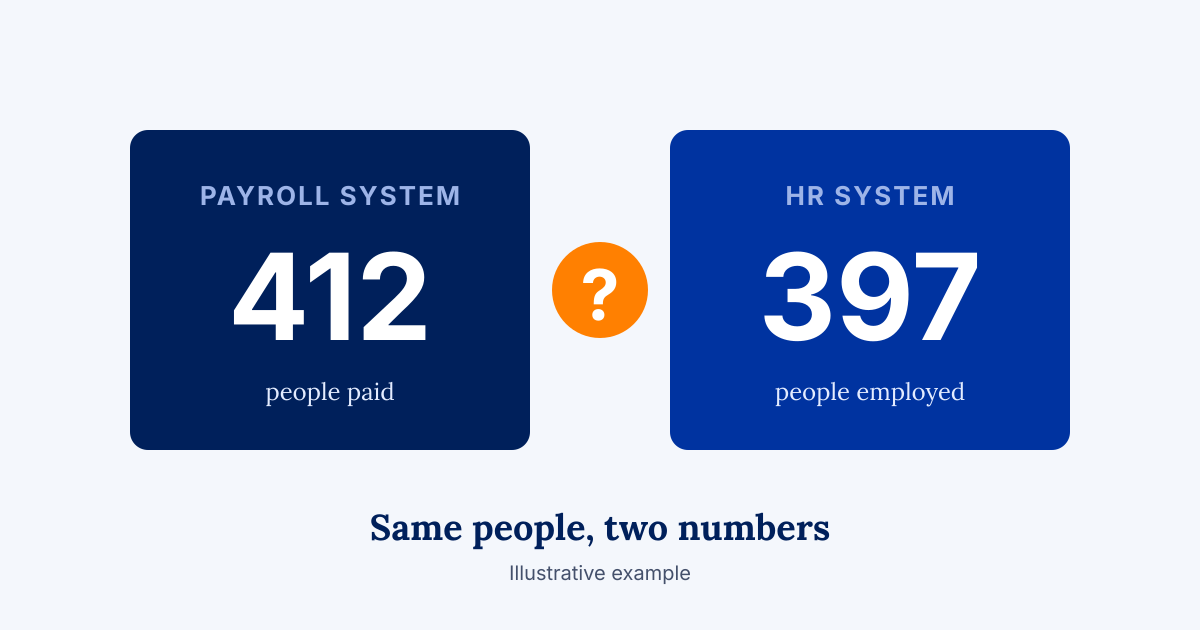
Why Do Two Systems Show Two Different Numbers?
They disagree because each one was built to answer a different question, and nobody defined the shared facts. A payroll tool counts people who were paid. An HR tool counts people who were hired and not yet separated. A finance tool counts cost centers. Without one written definition of "active employee," each count is correct inside its own system and wrong everywhere else.
Four causes account for most mismatches:
- Double entry. The same fact is typed into two places, and one copy is late or different.
- Different definitions. "Active," "closed," and "approved" mean something slightly different in each tool.
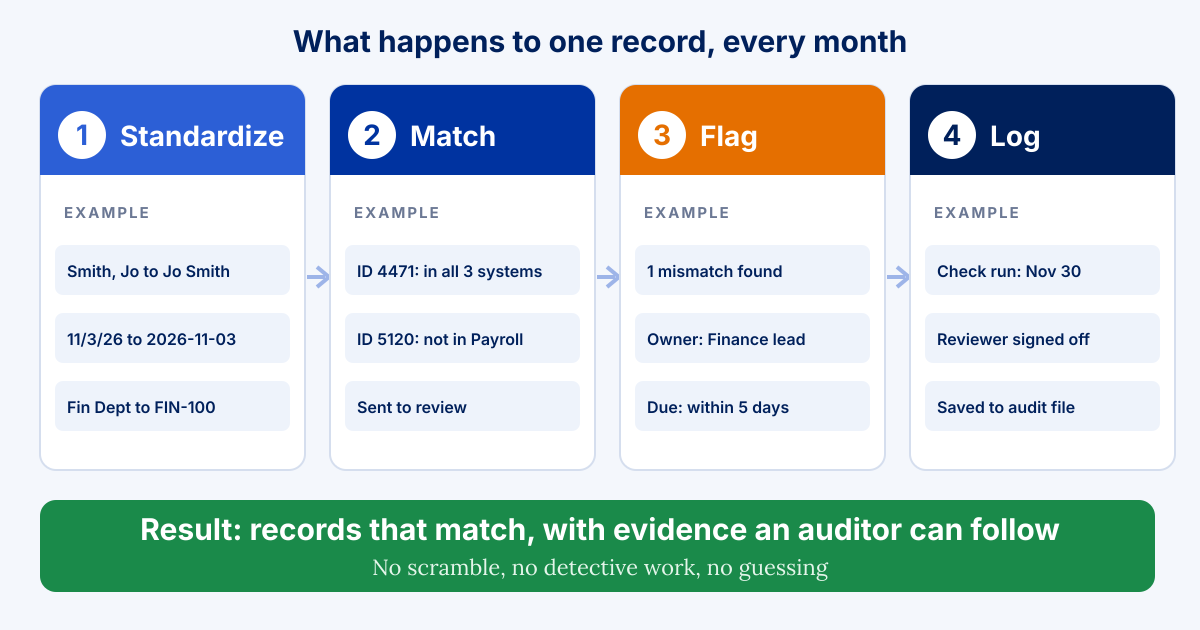
- Different formats. "Smith, Jo" and "Jo Smith" are the same person to a human and two people to a database.
- Different timing. One system updates daily and another is refreshed by hand once a month.
This is common, and it takes real time. McKinsey's 2023 Master Data Management Survey, which covered more than 80 large global organizations, found that 82 percent of respondents spent one or more days per week resolving master data quality issues, and 66 percent relied on manual review to manage quality. Eighty percent said some of their divisions operate in silos with their own systems and practices, and incompleteness, inconsistency, and inaccuracy were the top data quality issues. Those organizations are far larger than most readers of this article, so treat the numbers as a signal of how widespread the pattern is.
The cost shows up at the close, too. A Vena survey of 624 U.S. finance and accounting professionals, fielded in August 2026, found that 78 percent had to restate or correct numbers in the past year after the close was marked complete. Vena sells finance software, so read that as a signal and not a measurement of your team.
What Do Auditors Actually Look For?
They look for evidence that your records agree with each other and that someone checked. The details vary by audit type, funder, and regulator, so confirm your own requirements with your auditor. A few themes come up repeatedly in the guidance written by accounting firms and auditors.
First, consistency between what you report and what you recorded. In a September 2025 guide on single audits, the CPA firm GRF notes that federal financial and performance reports must be timely and consistent with accounting records. It lists mismatches between reports and internal records, and no supervisory review before submission, among the common errors.
Second, written documentation. The same guide puts the principle plainly: "If it isn't documented, it didn't happen." Auditors can rely on written records, not verbal assurances or good intentions.
Third, regular reconciliations with a named reviewer. At a July 2026 single audit update, CPAs from MD-CPAs recommended reconciling bank statements monthly with someone outside the disbursement process reviewing them, reconciling an online giving platform to the general ledger monthly, using a period-end close checklist with assigned owners, and requiring sign-off before reporting. They also advised documenting controls before the auditor arrives.
A note on scope. A single audit under the federal Uniform Guidance applies to organizations that spend $1,000,000 or more in federal awards, a threshold that rose from $750,000 for fiscal years beginning on or after October 1, 2024, according to GRF. Many organizations will face other audits, funder reviews, or board requests instead. The habits below help in all of them.
Step 1: How Do You Choose One Standard for Your Records?
Write down which system owns each fact, and give each record one ID. This is the least glamorous step and the one that does the most work. Everything after it depends on it.
- Name a system of record for each type of data. The HR system owns who is employed. The finance system owns what was spent. Other tools read from those, and nobody retypes.
- Give every person, vendor, award, and program one stable ID. Matching on an ID is reliable. Matching on names is a guess.
- Write one definition for each shared term. "Active employee," "closed award," and "approved expense" each get a sentence, an owner, and a date.
- Record the decisions somewhere people can find them. A one-page data dictionary beats a hundred hallway conversations.
Our article on Four (4) Ways to Automate Daily Workflows Without AI covers why giving each fact one home is the move that removes the most re-entry. This step applies the same idea to your reporting.
Step 2: How Do You Standardize Records Before You Match Them?
Clean the formats first, so the matching rules have something consistent to work with. SolvExia's guide describes reconciliation as comparing records across systems using defined matching criteria, such as reference numbers, dates, amounts, or unique identifiers. Matching is only as good as the fields you match on.
Five formatting rules cover most of the ground:
- Dates. One format everywhere, and one time standard if you work across regions.
- Names. One order, one rule for suffixes, and an ID that settles disputes.
- Codes. Program, department, and fund codes come from one list, chosen from a dropdown and never typed freehand.
- Amounts. One currency, one rounding rule, and one decision on whether totals include tax or fees.
- Required fields. A record cannot be saved without its ID, its owner, and its date.
Fix these at the point of entry whenever you can. A required field costs seconds. A cleanup project costs weeks.
Step 3: What Should an Automated Monthly Check Look For?
It should look for the same handful of problems, every month, without anyone having to remember. Automated checks are plain rules that run on a schedule and report what they find. They do not need AI, and they are easy to explain to an auditor because the rules are written down.
Six checks cover most needs:
- Completeness. Does every person in the HR system appear in payroll, and the reverse?
- Uniqueness. Does any ID or name appear twice?
- Totals. Do the totals in system A equal the totals in system B, within a stated tolerance?
- Validity. Are dates in range, amounts positive, and codes on the approved list?
- Timing. Were changes made in one system and not the other within the agreed window?
- Sign-off. Did a named person review last month's results?
If you work in Microsoft 365, one way to run these is to keep the records in Dataverse or SharePoint, schedule the checks in Power Automate, and send the results to a shared view in Power BI. Other platforms can do the same. What matters is that the checks run on a calendar, not on someone's memory.
Run them monthly at a minimum. Finance teams commonly reconcile some accounts more often. The more frequent the check, the smaller each discrepancy is when it appears, and the easier it is to trace.
Step 4: What Happens When a Check Finds a Problem?
Every flagged item gets an owner, a due date, and a recorded resolution. A check that finds a mismatch and then sits in someone's inbox has only moved the problem. The goal is a short, visible list that shrinks.
- Route each exception to the person who owns the record. Not to a general mailbox.
- Set a due date. Five business days works for many teams.
- Record what was found and what was done. One or two sentences are enough.
- Escalate what stays open. Anything past its due date goes to the next person up.
- Look for patterns. If the same field fails every month, fix the source and not the symptom.
Step 5: How Do You Keep a Trail Auditors Can Follow?
Keep the evidence as you go, not afterward. An audit trail is a timestamped, user-attributed record of each action taken on a record, as the payments company Corpay describes it in its guide on accounts payable. The same idea works for reconciliations: who ran the check, what it found, who reviewed it, and what changed.
A practical trail has five parts:
- The check log. Each monthly run, with date, rules applied, and results.
- The exception log. Each flagged item, its owner, and its resolution.
- The sign-off. A named reviewer, with a date, for each month.
- The data dictionary and policies. Definitions and procedures, date-stamped, with a review each year. MD-CPAs recommends date-stamping policy versions and reviewing them annually.
- The change history. When a rule or a definition changes, a note says what changed, why, and who approved it.
Done well, this keeps your records consistent, audit-ready, and updated without a scramble. It does not guarantee any audit outcome, and it does not replace the judgment of your finance and compliance leaders. It gives them better evidence to work with.
What Should You Measure to Know It Is Working?
Measure how much of the reconciling is still done by hand, and how fast problems get fixed. Track four numbers each month:
- How many mismatches did the checks find?
- How many were resolved within the due date?
- How many hours did the team spend matching records by hand?
- How many corrections were needed after reports went out?
If the first number falls over a few months, your standards are taking hold. If the third falls, you are getting hours back. Both are worth reporting to your leadership.
Where Should You Start?
Start with the one pair of systems that causes the most pain, and build outward. A simple order works for most teams.
- Pick the pair. Payroll and HR, grants and finance, or donations and the ledger are common starting points.
- Name the system of record and the shared ID. Write the definitions on one page.
- Clean the key fields. Fix formats and duplicates once, so the checks start from a clean base.
- Turn on three checks. Completeness, totals, and timing are a strong first set.
- Assign owners and a monthly sign-off. Put the review on the calendar before the first run.
- Keep the log. Save each month's results where your auditor can find them.
A Closing Thought
Two systems showing two numbers is not a sign that anyone did something wrong. It is a sign that nobody has yet written down which number is the real one. Write that down, check it every month, and keep the evidence. The next time an auditor's email lands on a Monday, the finance lead can open the files, see that the numbers agree, and get on with the week.
Frequently Asked Questions
How do you reconcile data across HR, finance, and operations systems?
Choose one system of record for each type of data, give every record one stable ID, standardize formats, and run automated checks on a schedule. Review the exceptions and keep a log of what was found and fixed.
What is a data validation check?
It is a written rule that tests records automatically, such as whether every employee in HR also appears in payroll, whether totals match, or whether dates fall in range. The results are reported to a named owner.
How often should you reconcile records across systems?
Monthly is a common minimum, and some accounts are reconciled more often. More frequent checks catch smaller discrepancies sooner, which makes them easier to trace and fix.
What documentation do auditors expect for reconciliations?
Requirements vary, so confirm with your auditor. Common items include a log of each reconciliation, a record of exceptions and their resolution, a named reviewer's sign-off, and dated policies.
How do you make records audit-ready without extra manual work?
Automate the checks and the logging so evidence is created as the work happens. Give every flagged item an owner and a due date, and keep sign-offs with each month's results.
Note: This article shares Blueprint's perspective and general guidance for educational and illustrative purposes. Every organization, program, and regulatory environment is different, so adapt these ideas to fit your context.

Real talk on systems work
Get practical insights on automation strategy, vendor selection, and building systems ready to scale. The kind of advice that saves you thousands and six months of headaches.