Four (4) Ways to Automate Daily Workflows Without AI
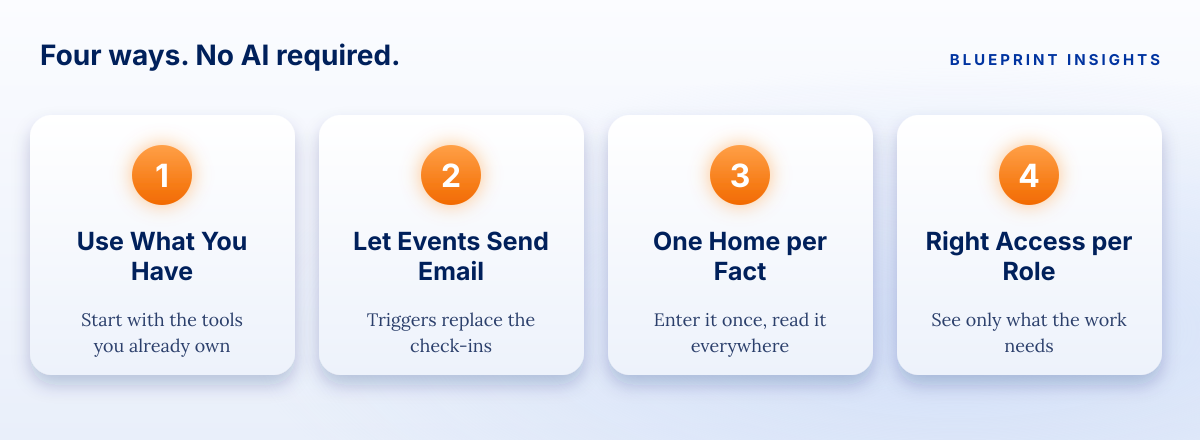
You can cut repeat admin work without AI. Use what you already have, let events send the email, give each fact one home, and match access to each role.


Notes on taking repeat busywork off your team's plate, using the tools you already have and the data you already protect.
It is Tuesday afternoon, and an operations lead is doing what she does every Tuesday. She exports the new intake responses, copies the fresh rows into the tracking sheet, pastes a few columns into a second sheet for the site teams, and sends three emails that say the same thing in slightly different words. It takes an hour and ten minutes. Nothing about it is difficult. All of it is repeated.
The work involves sensitive information, so she is careful. Her organization has not approved AI tools for beneficiary or student data, and she is not willing to guess. So the question is not "which new tool should we try?" It is how to cut the repetitive work without sending anything to a place her organization has not vetted.
This article answers that with four ways to automate daily workflows without AI. Each one uses plain rules and the kinds of tools many social impact organizations, philanthropies, and school and district teams already have. Each one is predictable: it does the same thing every time, and you can explain exactly what it did.
Why does repetitive admin work take so much time?
Repetitive admin work takes time because people are the connection between systems that do not talk to each other. Every copy, paste, and retyped field is a small job, and small jobs add up.
The numbers point the same way. In a July 2025 survey of 500 U.S. professionals run by Parseur and QuestionPro, respondents reported spending more than 9 hours a week, on average, moving data from emails, PDFs, spreadsheets, and scanned documents into digital systems. About half, 50.4 percent, said manual data entry leads to costly errors, delays, or lost opportunities, and 46.2 percent said they had never used tools to automate it. Parseur sells document processing software, so read the survey as a signal and not a measurement of your own team. The pattern is still familiar to anyone who has watched a Tuesday disappear.
Errors follow the same path. A 2024 literature review in Frontiers of Computer Science, reported by Phys.org, found that 94 percent of spreadsheets used in business decision-making contain errors. That figure comes from a review of earlier studies, so it describes how common errors are across the research, not how your files will look.
In our view, the fix is not working faster or being more careful. It is asking the system to do the repeating, so people can do the thinking.
What does "without AI" actually mean?
It means rules-based automation: if this happens, do that, every time. A form is submitted, so a record is created. A deadline passes, so a reminder is sent. A status changes, so the right person is notified. There is no model guessing what you meant, and no data leaving the tools your organization has already approved.
That predictability is the point. When the work involves sensitive information, being able to say exactly what happened, and why, matters as much as saving time. Rules-based automation is also easy to audit, because the rules are written down. If your organization later decides to approve AI tools, these four foundations make that step safer, not harder.
Way 1: Can the tools you already have do more than you are using them for?
Usually, yes. Most organizations already pay for a standard business platform with automation built in. Before you shop for anything new, find out what your current suite can do and who in your organization is already allowed to use it.
Start by listing three repeat tasks that follow clear rules, such as copying form responses into a tracker, filing email attachments, or routing a request for approval. If the answer to "does this follow the same steps every time?" is yes, it is a candidate.
If your team works in Microsoft 365, one example is Power Automate. Microsoft's training materials explain that it lets you watch the To, From, and Subject lines of incoming email and build workflows that act on specific conditions. Other suites offer similar features. The tool matters less than the habit of checking what you already own.
- Choose rule-based tasks. If a person has to use judgment each time, leave it manual for now.
- Start with one task. Prove it works, then add the next.
- Stay inside approved tools. If your organization has vetted it for sensitive data, it is on the list. If not, it is not.
Way 2: Can an event send the email for you?
Yes, and this is often the easiest win. An automated email trigger sends a message when something happens, so nobody has to remember to send it. It replaces the "quick question" and "just checking in" emails that fill a week.
Good triggers are specific and quiet:
- A form is submitted. The person gets a confirmation and the right owner gets a notice, with the details attached.
- A status changes. When a record moves from "received" to "approved," the next person is told right away.
- A date approaches. A reminder goes out a week before a report is due, and again two days before.
- An item sits too long. If nothing has happened in five days, the owner gets a nudge.
Write each message the way you would want to receive it: short, specific, and clear about what happens next. A trigger that sends vague messages creates a new kind of noise. A trigger that says "Site 3's attendance report is due Friday, and here is the link" removes a whole thread.
One caution: do not put sensitive details in the body of an automated email. Send a link to the record, inside a system with the right access, and let the permissions do their job. This connects directly to Way 4.
Way 3: What does it mean to give each fact one home?
It means each piece of information is entered once, in one place, and everything else reads from it. This is the step that removes the copy-and-paste Tuesday. The reason the operations lead copies rows between sheets is that the information lives in more than one place.
A simple relational database stores information in related tables: participants in one, sites in another, reports in a third, with each record connected to the others. Microsoft's own Dataverse training describes it this way: tables with rows for individual records and columns for their attributes, and relationships that let records in one table refer to records in another. You change a site's name once and it updates everywhere that site appears.
The same Microsoft training notes that business rules built at the data layer stay in effect regardless of where users interact with the data. In plain terms, you set a rule once, such as "a completion date cannot be earlier than a start date," and it protects every form and every view. That is far more reliable than asking everyone to remember it.
You do not need a large project to begin. Pick one process and give it one home. Our article on starting with one process walks through how to choose and map it.
Here is what changes once information has one home:
- Entry happens once. A fact is typed at the source and read everywhere else.
- Required fields and dropdowns replace free text. Fewer typos, fewer cleanup hours.
- One record per person, site, or report. Matching no longer depends on spelling.
- Reports update on their own. Nobody rebuilds them by hand each month.
Way 4: How do you control who sees what?
You give each role the access its work requires and nothing more. Role-based access is what makes the first three ways safe to use with sensitive information, because automation moves information quickly and permissions decide where it is allowed to go.
The principle has a name: least privilege. The federal standard NIST SP 800-171, Revision 3, published in May 2024, states it as allowing only the system access that users need for their assigned tasks. It also calls for reviewing the privileges assigned to roles at a regular interval and reassigning or removing them as needed. That standard was written to protect controlled unclassified information in nonfederal systems, so it will not apply to every organization. The idea travels well, though: define roles around jobs, not individuals, and revisit them.
A practical version looks like this:
- List the roles. Program staff, site coordinators, finance, leadership, and an administrator are a common starting set.
- Decide what each role needs. Which records can they see? Can they edit, or only view?
- Keep sensitive fields narrow. Not everyone who needs a participant's attendance needs their contact details.
- Review on a schedule. When someone changes jobs or leaves, their access changes the same day.
A colleague who left last spring is the example everyone recognizes. If their access still works, that is a gap. If it was removed the day they left, it is just a normal Thursday.
How do you decide which way to start with?
Start with the way that removes the most repeat work for the least risk. A simple order works for most teams.
- Write down your three most repeated tasks. Note how long each takes and how often.
- Mark which ones follow clear rules. Those are your candidates.
- Check where the data lives. If one fact is typed into three places, start with Way 3 for that process.
- Set roles before you automate. Decide who can see the records before a trigger starts sending links to them.
- Add one trigger at a time. Test it with a few real examples, then switch on the next.
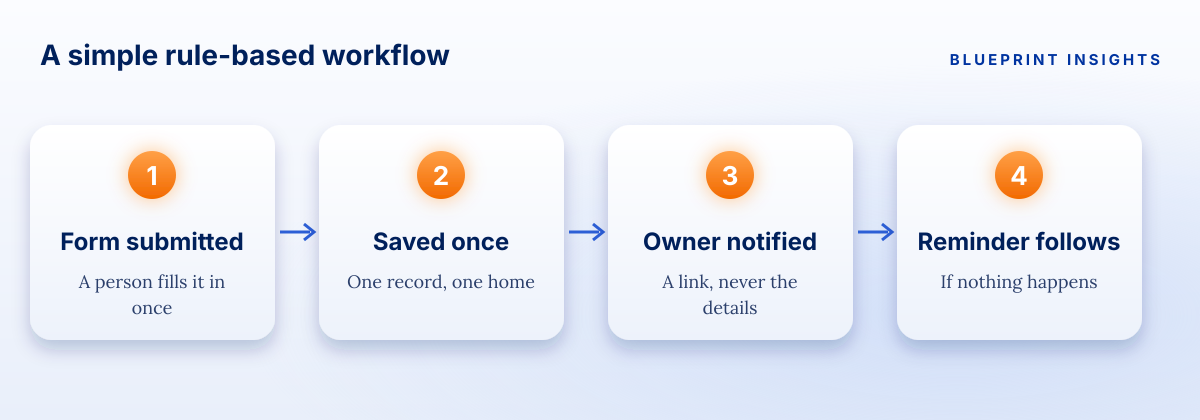
The diagram above shows what a finished version can look like. A form is submitted. The record is saved once, in one home. The right person is notified with a link. If nothing happens, a reminder follows. No one retypes anything, and every step can be explained.
What should you measure to know it is working?
Measure the work you removed. Before you automate a task, write down how long it takes each week and how many errors or corrections it produces. After a month, measure again. Four checks are enough:
- How many hours a week does this task take now?
- How many times is each fact typed by hand?
- How many follow-up emails are still needed to chase the same information?
- How many corrections show up after a report goes out?
Those numbers make the case for the next task on your list, and they give your leadership something concrete to approve. If this work feeds a funder, a board, or a district report, decide what you will measure before you build. Our article on building impact reporting that lasts covers that step.
What if people do not trust the automation?
Then show them what it does. Trust comes from being able to see the rules. Walk the team through the trigger, the action, and the result, and invite them to try to break it. Keep the manual way available for a short period, so nobody feels forced, and retire it once the team has seen it work. Rules-based automation has an advantage here: when something goes wrong, you can trace exactly why.
A closing thought
You do not need a new category of tool to get your Tuesday back. You need to look closely at the repeat work, give each fact one home, let events send the email, and make sure the right people see the right records. Start with one task. The next one gets easier.
Frequently asked questions
What is workflow automation without AI?
It is automation based on fixed rules, such as "when a form is submitted, create a record and notify the owner." It does the same thing every time and can be explained step by step.
How do you reduce manual data entry in spreadsheets?
Enter each fact once, in one structured home, and let reports and notifications read from it. Use required fields and dropdowns so errors are caught at the point of entry.
Can you automate workflows with sensitive data safely?
Stay inside tools your organization has approved, set role-based access so people see only what their work requires, and send links to records instead of putting sensitive details in emails.
What tasks should be automated first?
Start with repeat tasks that follow clear rules every time, such as copying form responses into a tracker, sending confirmations, and reminding owners of due dates.
What is role-based access?
It is a way of granting access by job role, so each role can see and change only what its work requires. Roles are reviewed regularly and updated when people change jobs.
Note: This article shares Blueprint's perspective and general guidance for educational and illustrative purposes. Every organization, program, and regulatory environment is different, so adapt these ideas to fit your context.

Real talk on systems work
Get practical insights on automation strategy, vendor selection, and building systems ready to scale. The kind of advice that saves you thousands and six months of headaches.