Start With One Process: Moving From Spreadsheets and Disconnected Tools to One System
Work scattered across files and tools does not need a big project to fix. Pick the one process that hurts most, map it in an afternoon, give it one home, and set five ground rules in week one.


Notes on getting organized when your work lives in too many places, written for teams who are busy and mid-stream.
It is Monday morning, and a program coordinator is trying to answer a simple question from her director: how many participants finished the last cycle? She opens the intake form export. Then the tracking sheet. Then the shared inbox where a partner sent corrections last week. Then the second sheet a colleague keeps "just in case." The numbers are close, but they are not the same, and now she has to decide which one is right.
Nothing about this is unusual. Work grows across forms, files, inboxes, and tools one reasonable decision at a time, until nobody can say where the real answer lives. The instinct is to fix everything at once, which is why so many teams fix nothing.
There is an easier way to begin. This article shows how to choose a single process, map it in an afternoon, give it one home, and set the ground rules that keep it from sprawling again. It applies whether you run programs in a school or district, a public agency, a philanthropy, a social impact organization, or a business.
Why does work spread across too many places so quickly?
Work spreads because every new need gets its own quick fix: a form for intake, a sheet for tracking, a separate file for the funder, a thread for corrections. Each fix is sensible on the day it is built. Together they create handoffs, and every handoff is a place where information gets retyped, lost, or contradicted.
The cost of those handoffs is measurable. In a Harvard Business Review study of 20 teams and 137 users at three Fortune 500 companies, people toggled between apps and websites roughly 1,200 times a day. That added up to just under four hours a week spent reorienting, about 9 percent of their time at work. Those are large organizations, so treat the numbers as a signal rather than a forecast for your team. The direction is clear: more places to look means more time lost to looking.
Errors follow the same path. A 2024 literature review in Frontiers of Computer Science, covering more than 35 years of research and reported by Phys.org, found that 94 percent of spreadsheets used in business decision-making contain errors. The figure comes from a review of earlier studies, so it describes how common errors are across the research, not how your own files will look. The authors also note that many people build spreadsheets without formal training in building them.
In our view, the spreadsheet is rarely the villain. The trouble starts when a file becomes the system of record for a process that has outgrown it. A spreadsheet is a fine place to think. It is a risky place to keep the only copy of the truth.
What is the easiest first step?
The easiest first step is to pick one process, not one tool. Choose the single process that causes the most re-entry or confusion, and work on that alone. Everything else can wait.
Start with the one process that hurts most, and give it one home. That sentence is the whole strategy, and it matches how governance specialists describe getting started. Tableau's data governance guidance recommends beginning with a minimum viable deployment, learning from small pilots, and keeping individual projects to about three months. Info-Tech Research Group describes a similar order for low-code adoption: pilot in a controlled environment, show early value, then scale.
Not sure which process to pick? Ask five questions and choose the one with the most "yes" answers:
- Does the same information get typed in more than once? Re-entry is where mismatched numbers are born.
- Do people ask the same question every week? "Where is the latest version?" and "Which number is right?" are signs the process has no home.
- Is there a deadline attached? Reports, renewals, and audits turn small mess into a scramble.
- Does one person quietly carry it? If the process breaks when they are out, it needs a system.
- Would fixing it free up people you need elsewhere? The best first process pays back time quickly.
How do you map the process in one afternoon?
Map the process on one page by writing down every step, every place the information lives, and every point where someone copies it by hand. You do not need special software. A whiteboard, a printed page, or a shared document is enough, and the people who do the work should be in the room.
Work through these steps in order:
- Write the trigger and the finish line. What starts this process, and what does "done" look like?
- List the steps in order. Use plain verbs: receive, check, enter, approve, report.
- Name every place information lives. Forms, files, inboxes, notebooks, and the spreadsheet someone made last year all count.
- Mark every handoff. Put a symbol wherever someone copies, retypes, emails, or exports.
- Add an owner to each field. Who decides what a "participant," a "completion," or a "renewal" means?
- Circle the three worst spots. These are where re-entry, delay, and disagreement pile up.
When the map is done, the problem usually looks smaller. Most processes have a handful of painful handoffs, and those handoffs tell you what the new home needs to do.
What does one home mean?
One home means one place where each piece of information is entered once, in a consistent structure, and where everything else reads from it. Reports, views, and exports draw on that home instead of being assembled by hand.
The form of that home depends on your size and needs. It might be a well-structured database, a purpose-built tracking system, or a connected set of tools feeding one shared dataset. The process decides the tool, not the other way around. What matters is that the home has four properties:
- One source of truth. If two people can open two versions of the same number, you do not have a home yet.
- Structure at the point of entry. Dropdowns, required fields, and consistent formats prevent cleanup later.
- A stable identifier. Every person, site, or record gets one ID that follows it everywhere, so matching does not depend on spelling.
- Built to be read. The structure anticipates the questions your reports will ask, so reports update when data does.
If you are already feeling the strain of files that do not talk to each other, our earlier article on evaluating vendors when you need systems to work covers what to ask before you commit to a build.
Which ground rules keep it from sprawling again?
Five ground rules, set in week one, keep a new home from turning back into a pile. They cost almost nothing and they are far easier to set at the start than to impose later.
- Name an owner. Every process and every field has one named person who decides what counts, approves changes, and answers questions when numbers disagree.
- Enter it once. Each fact is typed in one place. If it appears elsewhere, it is read from there.
- Write the definitions down. Keep a one page list of terms such as "enrolled," "active," and "completed," where everyone can see it.
- Give new requests one door. Before anyone adds a form, a sheet, or a tool, they tell the owner. Most sprawl begins with someone who meant well and asked nobody.
- Keep a short change log. A running list of what changed, when, and why lets a new colleague pick up where the last one stopped.
Ownership is the rule people skip, and it matters most. Tableau's guidance stresses assigning clear roles so you can see where data comes from, who owns it, and how changes are handled. Info-Tech lists unclear app ownership and uncontrolled sprawl across departments as common governance breakdowns.
If your team builds with low-code tools such as Microsoft Power Apps and Power Automate, the same logic applies with more at stake. Gartner's 2024 guidance says organizations that allow ungoverned adoption of those tools usually fail to meet their business goals for them, and a 2025 Gartner abstract says ungoverned, widespread use poses significant security, compliance, and operational risks. Owners and a single door for new requests are the cheapest protection you can add.
What does the first 30 days look like?
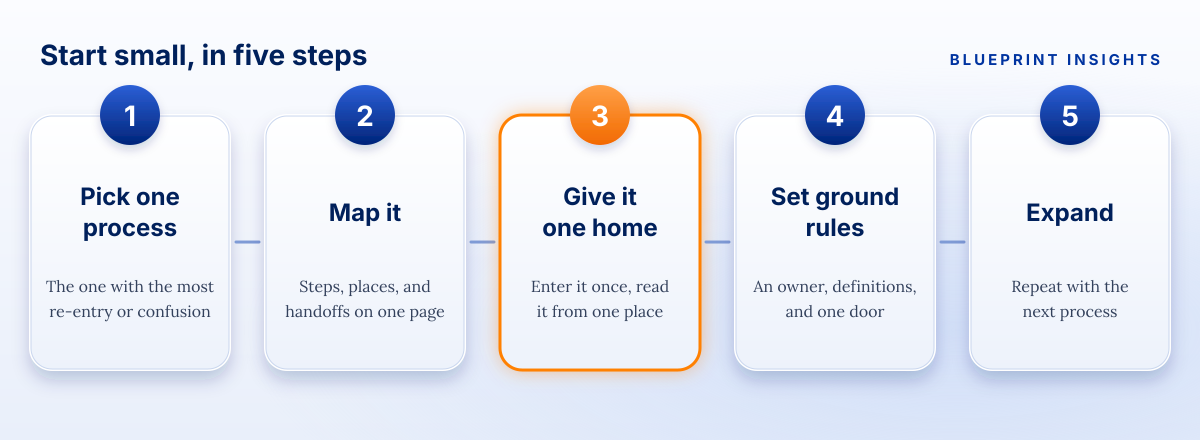
A realistic first month fits around normal work. It moves in four steps, one per week, and it ends with one process running from one home.
- Week 1: pick and map. Choose the process, run the afternoon mapping session, and name the owner. Write the five ground rules on one page.
- Week 2: design the home. Turn the three worst handoffs into requirements. Decide the fields, the identifiers, the dropdowns, and who can edit what.
- Week 3: move one cycle. Load one cycle of real records into the new home and run it alongside the old files, so people can compare answers without risk.
- Week 4: retire the copies. Mark the old files read only, point everyone to the new home, and hold a short review of what worked.
If a month feels too short for your process, shrink the process, not the standards. Pick a smaller slice, such as one program, one site, or one reporting cycle, and finish it properly.
How do you know the first step worked?
You know it worked when the process has fewer handoffs, fewer places to look, and fewer arguments about which number is right. Measure it with a few simple checks before and after:
- How many places does information for this process live?
- How many times is each fact typed in by hand?
- How long does it take to answer the question your director asks every month?
- How many corrections show up after a report goes out?
Write the "before" numbers during the mapping session. The "after" numbers are your proof, and they make the case for the next process on your list.
If your first process feeds a funder, a board, or a district report, decide what you will measure before you build. Our article on deciding what to measure before you launch shows how.
What if people keep using their own files?
Expect it, and plan for it. People keep personal copies because those copies are fast and familiar. Make the new home easier than the file, not stricter. Ask what the old file did that the new home does not, and fix that first. Keep the old files read only for a short period so nobody loses history, and make it clear which version is the one that counts.
A closing thought
Teams rarely get stuck because they lack a tool. They get stuck because the whole problem looks too big to start. Shrink it. One process, one home, and five ground rules are enough to turn a scramble into something people trust, and the next process gets easier because you have already done it once.
Frequently asked questions
What is the first step in moving from spreadsheets to a system?
Pick one process that causes the most re-entry or confusion and map it, including every place the information lives and every handoff. Work on that process alone before expanding.
How do you choose which process to fix first?
Choose the process where the same information is typed more than once, people ask the same questions every week, a deadline is attached, and one person quietly carries the work.
What does "one home" for data mean?
It means one place where each piece of information is entered once, in a consistent structure with a stable identifier, and where reports read from it instead of being assembled by hand.
What ground rules should we set in week one?
Name an owner, enter each fact once, write the definitions down, give new requests one door, and keep a short change log.
How long should the first step take?
About a month for one process, in four steps: pick and map, design the home, run one cycle in parallel, then retire the old copies. Shrink the scope, not the standards, if you need less time.
Note: This article shares Blueprint's perspective and general guidance for educational and illustrative purposes. Every organization, program, and regulatory environment is different, so adapt these ideas to fit your context.

Real talk on systems work
Get practical insights on automation strategy, vendor selection, and building systems ready to scale. The kind of advice that saves you thousands and six months of headaches.