When Growth Breaks Your Back Office: Bringing Order to Disconnected Tools and Approvals
Growth leaves teams reconciling records by hand. One connected system, automated approvals, audit-ready logs, and a clear leadership view restore order, and ongoing engineering support keeps it that way.


Notes on replacing hand-reconciled spreadsheets with one connected system, and keeping it healthy as you scale.
It is the Wednesday before an audit, and the finance lead is on her third spreadsheet of the morning. The acquisition closed in the spring. Since then, HR has run two systems, payroll runs a third, and the headcount in one does not match the headcount in another. So she exports each list, lines them up by hand, and flags the rows that disagree. Down the hall, a new vendor is waiting on an approval that was sent by email nine days ago. Nobody is sure which inbox it landed in.
None of this is anyone's failure. The business grew, and the tools did not grow with it. This article explains what happens to back-office work when that gap opens, how to close it with one connected system, and why the people who stand behind that system matter as much as the system itself.
What Happens to Back-Office Work When a Business Grows Faster Than Its Systems?
People become the connection between the tools. When records live in separate places, someone has to carry information from one to the next, check that the copies agree, and chase whatever does not. That work is invisible until it breaks something.
Finance teams describe it clearly. A Vena survey of 624 U.S. finance and accounting professionals, fielded in August 2026, found that the average month-end close takes 6.2 business days, and that 78 percent of respondents had to restate or correct numbers in the past year after the close was marked complete. Their most-cited challenge, at 34 percent, was chasing down information from other departments. A separate Ledge benchmark of 100 finance professionals found that 94 percent of teams use spreadsheets in the close, 50 percent say they are a key reason the close runs slow, and cash reconciliation alone takes an average of 20 to 50 hours a month across 3 to 5 systems.
Both studies come from companies that sell finance software, so read them as signals, not measurements of your own team. They still describe a pattern that anyone who has worked a close recognizes: the delay is rarely the calculation. It is the gathering.
HR and operations feel the same pull. In recent research summarized by Workday, 84 percent of the 128 leaders interviewed said that integrating HR, payroll, and finance systems and reconciling the data between them is a major operational pain. Workday sells HR and finance software, and the interviews were not broken out by organization type, so treat that figure the same way. The direction is consistent.
Why Do Acquisitions Make Disconnected Tools Worse?
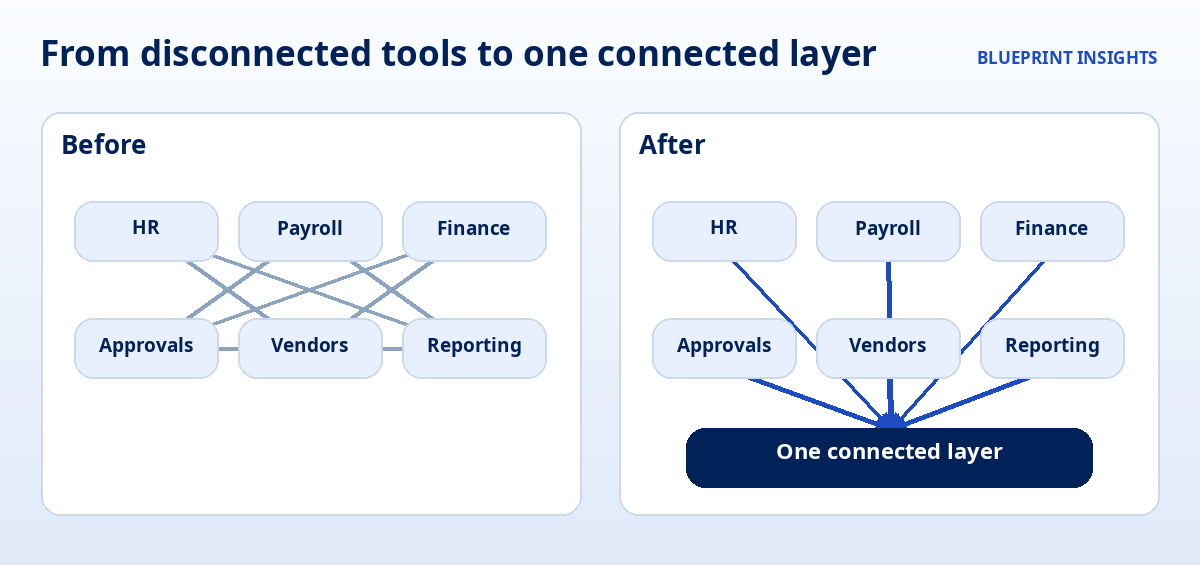
An acquisition doubles the number of systems overnight and leaves every definition in question. Two HR platforms, two chart-of-accounts structures, two ways of naming the same vendor. SAPinsider, writing about post-acquisition finance, notes that disconnected systems lead to low cash visibility, inconsistent data, and unreliable reporting.
The Vena survey shows how much the number of systems matters. Among teams that pull from 7 to 8 systems during the close, 52 percent spend half or more of it on manual work. Among teams using 3 to 4 systems, the figure is 15 percent. More systems mean more hand-carried information.
The fix is not to replace everything at once. Acquisitions rarely leave time for that. The fix is to decide what must be true across all of it, and to build one connected layer that makes it so.
What Does One Connected System Actually Mean?
It means each important fact has one home, one owner, and one definition, and every other tool reads from it. We call that the architecture, and it is less dramatic than it sounds. It is a handful of decisions made once and enforced everywhere.
- One record for each person, vendor, and project. Each gets a stable ID, so "Acme Supply" and "ACME Supply Co." stop being two vendors.
- One definition for each number. Headcount, active vendor, and approved spend each mean one thing, written down, wherever they appear.
- One place where changes happen. A change is made at the source and flows outward. Nobody retypes it.
- Existing tools stay where they work. The connected layer links your payroll, HR, and finance tools instead of forcing a rebuild.
If your team works in Microsoft 365, one common way to build this layer is to keep the records in Dataverse or SharePoint, build the approval screens in Power Apps, run the routing in Power Automate, and report through Power BI. Other platforms can do the same job. The tool matters less than the discipline of deciding what lives where. Our article on starting with one process shows how to choose the first process to bring into one home.
How Do Automated Approvals Replace the Email Chain?
Automated routing sends each request to the right person, in the right order, and keeps track of where it is. The approver sees a clear request with the details attached. The requester sees its status. Nobody forwards anything.
The cost of the email chain is easy to underestimate. In an October 2025 survey of 500 U.S. marketing and advertising professionals by Pollfish for StreamWork, 85 percent said approvals regularly run past planned timelines, and 72 percent said they have to re-route or adjust approval workflows mid-process. The respondents were in marketing, and StreamWork sells approval software, so the numbers will not match every back office. The mechanics will look familiar, because an approval that depends on someone remembering to forward an email breaks in the same ways everywhere.
A well-built approval flow has five parts:
- A single request form. Required fields and dropdowns replace free text, so the request arrives complete.
- Rules for who approves what. Amount, department, and type decide the route, and the rules are written down.
- Escalation when nothing happens. If a request sits for three days, it moves to a backup approver.
- Delegation for time away. Approvers set a stand-in, so travel does not stall payroll.
- A status anyone can check. The question "where is it?" has an answer that does not require asking a person.
What Makes a Log Audit-Ready?
An audit-ready log records who did what, to which record, and when, automatically, at the moment it happens. An accounts payable vendor, Corpay, describes an audit trail as a continuous, timestamped, user-attributed record of each action, and puts the standard plainly: auditors look for evidence that a control operated on a specific transaction, at a specific time, by a specific person.
That standard is hard to meet from email. An approval policy that lives in a document and leaves no record of each decision is an intention, not evidence. When approvals run through one system, the record builds itself. Each request carries its submission, its approver, its decision, and its timing, so a question that once took a week of searching sent folders takes a minute.
A few habits keep the log trustworthy:
- Capture at the source. The system records the action. People are not asked to remember to log it.
- Record changes as well as decisions. If an amount or a vendor changes after approval, the log shows it.
- Limit who can edit the history. Anyone can read the trail they are cleared to see. Almost no one can alter it.
- Keep it exportable. The person preparing for the audit should be able to pull a clean report without a project.
Done well, this keeps records consistent, audit-ready, and automatically updated. It does not replace judgment, and it does not guarantee any particular audit outcome. It removes the scramble.
What Should an Executive Dashboard Show?
It should show the few numbers leaders act on, with the exceptions first. A dashboard that shows 40 measures asks leaders to find the problem themselves. A dashboard that shows 6 measures and flags what is off tells them where to look.
In our view, three rules do most of the work:
- One definition for each KPI. If finance and HR define "headcount" differently, the dashboard will start an argument instead of ending one.
- Exceptions on top. Approvals stuck past their limit, records that fail a check, and deadlines at risk belong at the top, before the totals.
- Read from the connected layer. A dashboard built on hand-reconciled spreadsheets inherits their errors. A dashboard built on one source updates on its own.
When leaders trust the numbers, the weekly meeting changes. It stops being about whose figure is right and starts being about what to do. Our article on deciding what to measure before you launch covers how to choose the measures before you build.
Why Does Engineering Partnership Matter After Launch?
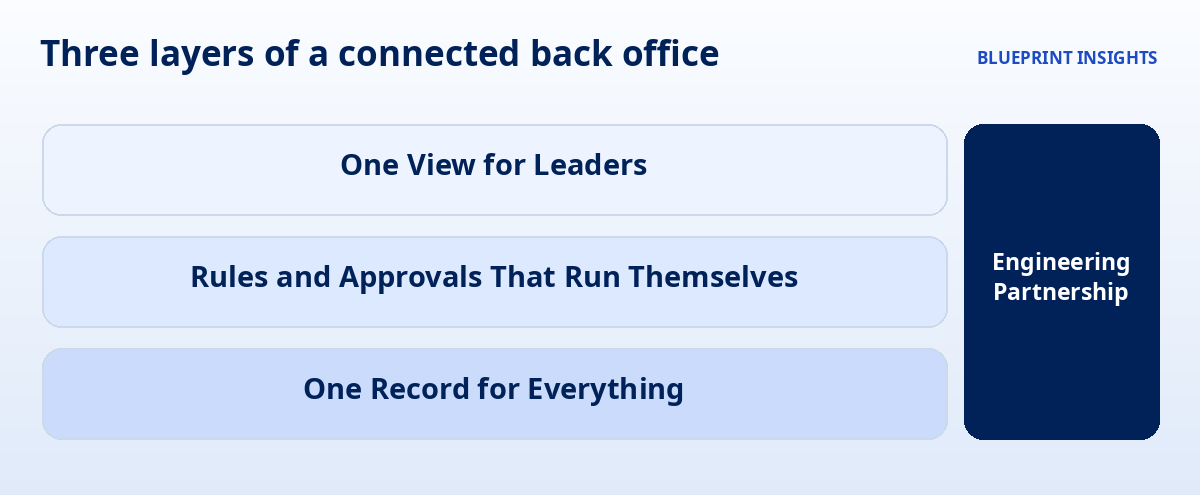
Because a connected system is a living system. The day it launches is the day the business starts changing around it. A new acquisition adds a platform. A policy changes the approval thresholds. A staff member moves roles and their permissions drift. The system stays useful only if someone keeps it aligned with the organization it serves.
Microsoft's own guidance reflects this. It describes application lifecycle management as covering governance, development, and maintenance, with governance including data security, user access, change tracking, review, audit, deployment control, and rollback. Its adoption guidance for Power Platform adds a plain warning not to treat low-code workloads as low complexity, and suggests using a decision matrix to set the level of formality by a workload's complexity and criticality. Systems that carry approvals, permissions, and audit records for several departments sit at the serious end of that scale.
In our view, that is the reason to plan the partnership before the build, not after it. A good one covers four things:
- Stewardship. Someone knows how the whole system fits together, so a change in one place does not quietly break another.
- Change handling. New rules, new tools, and new entities are added deliberately and tested before they reach users.
- Permissions and review. Access is reviewed on a schedule, so roles keep matching jobs.
- A clean handoff path. Your team can run day-to-day tasks on its own, with documentation and plain-language training, and a technical partner behind it for the harder moments.
Having a partner does not mean being dependent on one. It means the system you built has the same care around it that the rest of your operations get.
Where Should You Start?
Start with the single process that causes the most re-entry or confusion, and build outward from there. A simple order works for most teams.
- List your systems and what each one owns. Note where the same fact appears in more than one place.
- Pick the one process that hurts most. Approvals, onboarding, and the monthly close are common first choices.
- Give its key records one home and one ID. Decide the definitions before you build.
- Route the approvals and turn on the log. Test with real requests and a small group.
- Add one view for leaders, with exceptions first. Then decide who owns the system after launch.
Our article on Four (4) Ways to Automate Daily Workflows Without AI shows how rule-based automation handles the daily repeat work in the meantime.
A Closing Thought
Growth is a good problem to have, and it deserves a back office that keeps pace. You do not need to rebuild everything. You need one record for each thing that matters, approvals that route themselves, a log that writes itself, and a clear view for the people making decisions. Then you need someone who stays with the system as the organization changes. The finance lead from the start of this article should be able to say, on the Wednesday before the audit, that the numbers agree. Build for that Wednesday.
Frequently Asked Questions
How do you reconcile data across disconnected business systems?
Give each key record, such as a person or vendor, one stable ID and one owning system, then connect your other tools to read from it. Write down one definition for each shared number so every report counts the same way.
What is a unified system architecture?
It is a connected design where each important fact is stored once, in one place, and every tool, approval, and report reads from it. It links existing tools instead of forcing a full replacement.
How do automated approval workflows work?
A request is submitted through one form, routed by written rules to the right approver, escalated if it sits too long, and tracked in a status anyone can see. Every step is recorded with who acted and when.
What is an audit-ready log?
It is a timestamped record, captured automatically by the system, of who took each action on each record. It helps show that a control operated as intended, and it makes preparing for an audit faster.
Why do custom low-code systems need ongoing support?
Organizations change after launch, with new tools, new rules, and new people. Ongoing stewardship keeps permissions, integrations, and approval rules aligned so the system stays accurate and trusted.
Note: This article shares Blueprint's perspective and general guidance for educational and illustrative purposes. Every organization, program, and regulatory environment is different, so adapt these ideas to fit your context.

Real talk on systems work
Get practical insights on automation strategy, vendor selection, and building systems ready to scale. The kind of advice that saves you thousands and six months of headaches.