Why Program Reporting Is Always a Scramble: Three (3) Data Habits to Fix Before You Automate
Reporting scrambles usually come from 3 habits: free-text entry, copying data between tabs, and requirements scattered across documents. Use controlled lists, enter each fact once, and give every requirement one row before you automate.


Notes on the small data habits that turn every reporting deadline into a scramble, written for teams that track grant requirements in spreadsheets today.
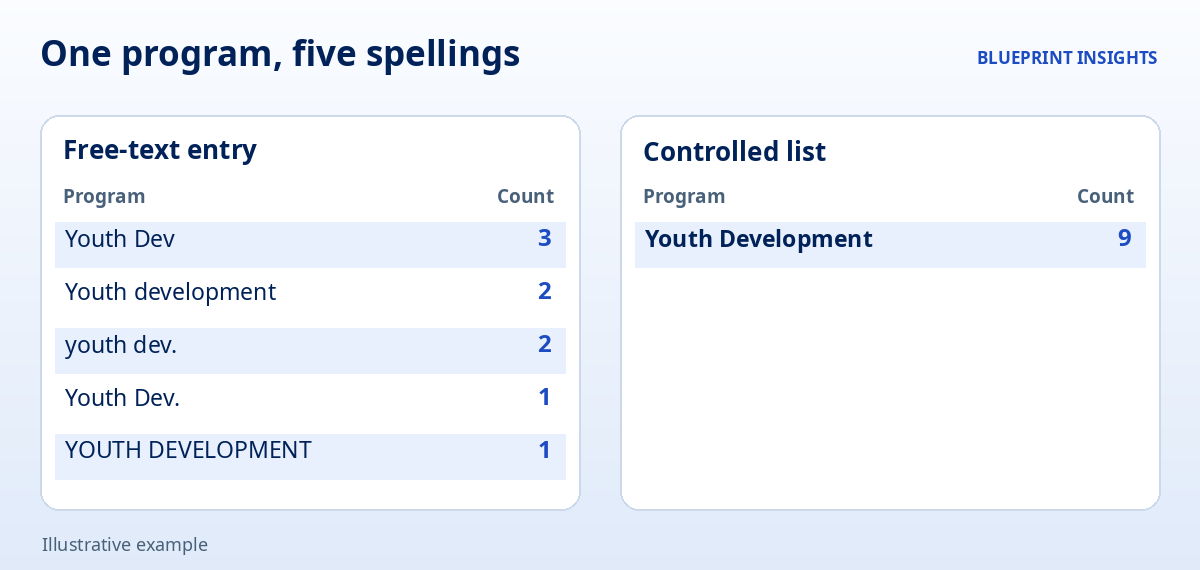
It is Thursday afternoon, and the report is due Friday. The program lead opens the tracking file and filters the "Program" column to count participants. The same program shows up 7 different ways: Youth Dev, Youth development, youth dev., and a few others with a trailing space that nobody can see. She fixes them by hand, then notices that last month's numbers on the summary tab do not match the detail tab. Somebody pasted values over a formula in March. Nobody remembers who.
Meanwhile, the grant requirements live in 3 places: a PDF of the award terms, an email thread, and a note in the margin of a printout. The finance lead is not sure whether the quarterly report is due on the 15th or the 30th. Everyone is capable. Everyone is tired. And the same scramble will happen next quarter.
If this sounds familiar, the cause is probably not effort or skill. It is 3 small habits in how the data is entered, moved, and tracked. This article explains each one in plain terms, why it matters, and how to fix it without buying anything new. These are the habits worth fixing before you automate, because automation repeats whatever it is given, good or bad.
Why Is Program Reporting Always a Scramble?
It is a scramble because small inconsistencies pile up until someone has to clean them at the last minute. Three things tend to happen together:
- People type the same fact differently. Free-text cells accept anything, so one program, one site, or one funder ends up with several spellings.
- People copy data from place to place. Every copy is a chance for a stale number, a skipped row, or a formula replaced by a pasted value.
- Requirements are scattered. Deadlines and conditions live in documents, emails, and memory instead of one place that everyone checks.
The research on spreadsheets is sobering. A 2024 literature review in Frontiers of Computer Science, led by Pak-Lok Poon, looked back over 3 decades of studies and reported that 94 percent of spreadsheets used in business decision-making contain errors. That number comes from reviewing earlier studies rather than from a new audit, so treat it as a sign of how common errors are, not a precise rate. The review also found that most research focuses on testing and fixing spreadsheets after they are built, and it recommends more attention to planning and design up front. That is exactly where these 3 habits sit.
Grant reporting adds to the load. NTEN's 2025 Data Empowerment Report, a survey of about 220 organizations, found that 89 percent say staff enter data directly into their data systems. It also found that 34 percent rate funder priorities or grant reporting requirements as a major influence on the data they collect, and that 72 percent produce custom reports matched to each funder's requirements. Only 11 percent produce one standardized report for every funder. The sample is small, so read it as a snapshot rather than a benchmark.
Government oversight points to the same kind of weakness. In a March 2025 report, the U.S. Government Accountability Office (GAO) analyzed 3,680 single audit findings from 2022 to 2024 involving federal grant recipients that passed money to subrecipients. Incomplete subaward reporting accounted for 14 percent of the findings, and the most common root cause GAO identified in those cases was deficient internal controls. That report focuses on one slice of federal grants, so it does not describe every funder. It does show that missing or inconsistent reporting is a documented, recurring problem.
Now to the 3 habits.
Habit 1: How Do You Replace Free Text With Controlled Lists?
Let people pick from a list instead of typing. Any field you will later count, filter, or group should offer a short set of approved choices. Program, site, funder, status, category, and grade level are the usual candidates.
The reason is simple. A November 2024 guide in PLOS Computational Biology by Marla Hertz and Ashley McNeill recommends building dropdown menus for categorical fields so they contain only allowed values, and setting validation rules before anyone enters data. It notes that standard input matters most when several people enter data over time, because one item written 2 ways can be read by analysis software as 2 different things. It also advises 1 piece of information per cell, with each row as 1 record and each column as 1 variable.
Here is how to put this into practice:
- List your counting fields. Look at your last report and write down every column you used to count or group results.
- Write the approved choices. Keep each list short and clear. Use the same wording your funders and board use.
- Name an owner for each list. One person adds or retires choices, so lists do not grow into a new mess.
- Turn on validation. Most spreadsheet and database tools can restrict a cell to a list or a date format. Use that feature on the entry cells.
- Plan for "Other." Add an "Other" choice with a required note, and review those notes monthly. If the same note keeps appearing, it probably deserves a place on the list.
- Clean the history once. Fix existing entries so the old data matches the new list, then stop cleaning by hand.
This habit costs an afternoon and saves hours every reporting cycle. It also makes every later step, from pivot tables to dashboards, far easier.
Habit 2: How Do You Stop Copying Data Between Tabs and Files?
Enter each fact once, in one place, and let everything else read from it. When the same number is typed or pasted into several tabs, the copies drift apart. The summary says one thing, the detail says another, and someone has to decide which is right.
Copying also hides who changed what. When a pasted value replaces a formula, nothing flags it, and the report quietly stops updating.
Here is how to reduce copying:
- Choose one home for each fact. A participant's enrollment date lives in 1 tab. A grant's end date lives in 1 row. Everything else points to them.
- Use lookups, not pastes. Pull values from the home location with a formula or a link, so changes flow through automatically.
- Separate entry tabs from report tabs. People type only on the entry tabs. Report tabs contain formulas and nothing else, and they are protected from editing.
- Mark exports as snapshots. If you must send a copy to someone, name it with the date and treat it as read-only. Do not edit it and merge it back.
- Keep one master file. Retire "FINAL_v3" and "FINAL_v3_revised." If you need versions, keep them in a clearly labeled archive folder.
It also helps to do a quick reconciliation each month: compare the totals on your report tab to the totals on your entry tab, and write down any difference.
If you want to go a step further and make one connected record feed several funder reports, see our article on Impact Reports Without the Spreadsheet Scramble.
Habit 3: How Do You Give Every Requirement One Source Row?
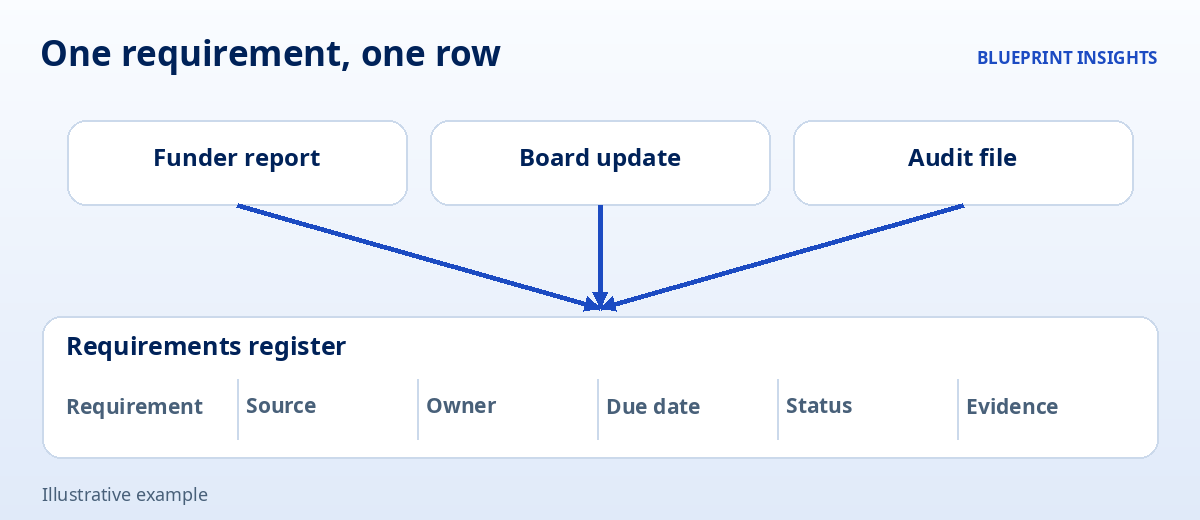
Give each grant requirement exactly 1 row in a single requirements register. A register is just a table where every obligation lives in one place: what is required, where it came from, who owns it, when it is due, and where the proof is kept.
Teams without one tend to learn about a requirement when it is already late. GAO's 2025 findings are a reminder of why this matters. Among the findings about incomplete subaward reporting, deficient internal controls were the most common cause, and in a smaller share of cases the auditee simply lacked evidence such as records or tracking. A register addresses both problems at a basic level, because it names an owner for each obligation and points to the evidence.
A useful register has the same columns for every row:
- Requirement. One obligation, written plainly. If an award term contains 3 duties, make 3 rows.
- Source. The funder, the award, and the section or page where it appears.
- Owner. One named person, not a team.
- Due date. A real date, or a rule such as "30 days after quarter end," with the first date filled in.
- Status. Chosen from a list, such as Not started, In progress, Submitted, and Accepted.
- Evidence. A link to the report, the receipt, or the approval that shows it was done.
Two habits keep the register honest. First, when an award is signed, someone reads it line by line and fills in the rows that same week. Second, every reporting document, whether for a funder, a board, or an auditor, reads from the register instead of keeping its own list of deadlines. Because the requirement lives in one row, a change gets made once.
Federal awards carry many specific rules, and each funder's terms differ, so confirm the details with your award documents and your auditor.
How Do You Fix All 3 Habits Without Stopping Your Work?
Fix them in order, one small step per week, using real data from your next report. A 4-week plan works well for most teams:
- Week 1: Lists. Pick the 3 columns you count most often. Write approved choices, turn on validation, and clean the history.
- Week 2: Entry and report tabs. Split typing from reporting. Replace pasted numbers on report tabs with links or lookups.
- Week 3: The register. Read your 2 most important awards line by line and create one row per requirement, with an owner and a due date for each.
- Week 4: A test run. Build your next report from the cleaned data. Compare it to the last one and write down every difference you find.
Be realistic about what this achieves. Better habits reduce the number of mistakes that can happen, but they do not eliminate them. So add a second pair of eyes to your process: a short monthly review where a colleague checks totals and spot-checks a few rows. The 3 habits prevent errors. The review catches what is left.
What Do These Habits Prepare You For?
They prepare your data for automation, because automation depends on clean inputs. A reminder that fires on a due date needs a real date in a consistent field. A dashboard that counts participants by program needs one name per program. A report that builds itself needs each number to live in one place. If you automate first, you get the same errors faster, spread across more people.
When the habits are in place, the next steps become much smaller than they sound: a form that feeds the entry tab, an automatic reminder from the register, a report that refreshes on a schedule. Many teams find they need less new technology than they expected, because the real obstacle was never the tool. It was the shape of the data.
A Closing Thought
Reporting season will probably always be busy. It does not have to be a scramble. Three habits, a list instead of free text, one home for each fact, and one row for each requirement, turn a last-minute cleanup into a routine check. The team still needs good judgment and careful reading. It just stops spending its best hours fixing spelling.
Frequently Asked Questions
Why does program reporting take so long?
Data is usually typed in different ways, copied between tabs and files, and tracked against requirements that live in several places. Cleaning and reconciling it by hand at the deadline takes far longer than checking clean data.
What should be fixed before automating reporting?
Fix how data is entered, moved, and tracked: use controlled lists instead of free text, enter each fact once, and give each requirement one row with an owner, a due date, and evidence.
What is a controlled list in a spreadsheet?
It is a short set of approved choices that people select from instead of typing. It keeps one program, site, or funder from appearing under several spellings, which makes counting and filtering reliable.
How can we reduce errors when copying data between tabs?
Choose one home for each fact and use links or lookups instead of pasting. Keep entry tabs separate from report tabs, and compare report totals to entry totals each month.
What is a requirements register for grants?
It is a single table with one row per obligation, showing the requirement, source, owner, due date, status, and a link to the evidence. Reports and deadlines read from it, so changes are made once.
Note: This article shares Blueprint's perspective and general guidance for educational and illustrative purposes. Every organization, program, and regulatory environment is different, so adapt these ideas to fit your context.

Real talk on systems work
Get practical insights on automation strategy, vendor selection, and building systems ready to scale. The kind of advice that saves you thousands and six months of headaches.